
User manual


Telephone Voice Recording System
Page|15
CopyrightUltraDisk™2010Allrightsreserved
Explain: If setting the EXT123 is not record, this Extension dial call out or incoming caller all not record
the list & voice in the database, if user need keep the record in the Indexmain.mdb, can setting the
“Y” in the “If Keep Info”, but not save the Voc file.
Keep EXT record Command: If setting the Value is **123
When Setting the Extension is not record, system don’t save the recording list & Voice file, if user feeling
is very important for this talk, can put the key value **123 on the phone key-presscan activation system
record the voice file for this phone
Note: this function is need setting with ‘User TVRS DTMF’ by PBX Setting
PBXSetting
3.2.6.1 Recording in PBX Extensions:
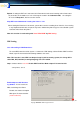
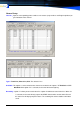
To record PBX extensions Click System -> Advanced-> PBX Setting, Click on Enable PBX Trunk Rec.
Mode, Open IP channel to Call Accounting Software and save it.
Note: This function is need PBX can Output charge by Call accounting system, the charge bill in-
clude TRK, EXT, Dial-NO.( incoming/Outgoing) info can installed
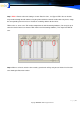
Step 1: Choose with the red circle Enable PBX Trunk Rec. Mode & Open IP channel to CAS
same picture, save it
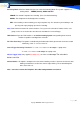
Enable Output to Call Account-
ing Softwre: If User haven’t the
PBX, need Charge the Phone
Record, Can choose this option
With Open IP channel to CAS
(need install CAS)