
User manual


‐14‐
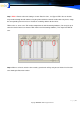
Max. Recording Length (in Minutes)
It is a good practice to avoid generating large recording files. The default value is 60 minutes for a
single recording file. You can also use "FULL TIME RECORDING”, “AUTO SPLIT RECORDING” files
in this size.
Loop Recording (erase earliest recorded files when there is no space):
Will automatically delete the first recorded files when there is no remaining space in the selected par-
tition.
Reserved HDD space value (MB):
Will automatically alarm and stop recording when the available space is lower than this value. Used
for designated the C disk as a storage device for the voice files when there is lack of system re-
source. Leave space for the virtual memory to avoid using up the system resources as it may cause
the system to crash.
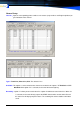
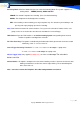
ExtensionManagement
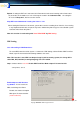
By using the TRK recording (recording the extension conversation work with the Call Accounting Soft-
ware) and it can be very effective. Can identify the user‘s name, department, password corresponding
to an extension and to find out whether an extension is recording or not.