
User manual


Telephone Voice Recording System
Page|13
CopyrightUltraDisk™2010Allrightsreserved
DiskManagement
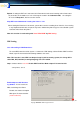
Please select a Disk to save the recorded files
Enter a Drive name to store the recorded files. (Do not enter a Read-only disk like a CDROM or a
DVDROM drive.) The default drive is D: (If drive D: does not exist, then it is stored in C)
To Compress the Recording Files
In order to compress the voice recording, set “Y”. This would help you save disk space. (Note: The
default value is “Y”.)
Compression Rate:
Set 2 Rate compress is the Hardware compressing by hardware, can recorder 70 hours HDD/G, the
Voice file format is *.vc2;(ZS-U2100, ZS-3100 series products default this setting)
ZS-4200, D5130 series is 8 rate compress by hardware, can recorder 280 hours HDD/G, the file for-
mat is *.NTC & *.vc8 , If choose “N” is Create the voice is *.WAV files.
Low HDD space warning
When the remaining hard disk space is less than the value specified, the system will popup a Warn-
ing window and displays the remaining HDD space available and the remaining recording time left, so
that the operator will have enough time to deal with the situation. (Note: The default value is 500 MB.)