
User manual

‐10‐
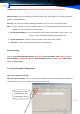
Only record special Number, the other call all not recording
Sample: if only the record 10000 NO. setting same for this step.
1. choose the ‘Record Special Number Only
2. put in the 10000 Tel NO.
AutoBackup
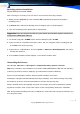
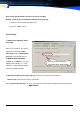
1. Database Auto Backup (index-
main.mdb)
When a call is finished, the call log
data will be stored in the index-
main.mdb and in the Backup Data-
base file. The default file name is
D:\MDR BACKUP\Index2005-
11.mdb, where ‘2005-11’ is the year
(2005) and the month (11). Every
month the system will automatically
take backup of this database.
2. Backup recorded files at regular intervals. (You can set a time interval in minutes).
Default value: Not checked, interval is 30 minutes.
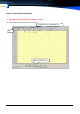
3.2.2.1 System Files Backup: The User can customize the path for the Auto Backup. The default path is
: \MDR BACKUP
System will Convert the Voc
file to
WAV
when Auto BackUp