
User manual

Page | 6 Copyright UltraDisk™ 2009 All rights reserved
Adjust volume
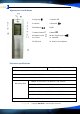
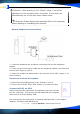
Press “volume+/volume-” buttons ② ③ to adjust the volume.
Select file to play:
Press button ④ to playback for next file
press
button ⑤ for previous file.
Hold and press
or button ④ ⑤ for fast forward or rewind, release to
start playing again.
Recording monitor function
Listening with earphone when the recording is proceeding, you can hear what
you are recording and various effect of recording in different modes.
Hearing aid function
For the person whose hearing is not so good, the monitor volume can be
adjusted for hearing aid.
Adjusting the monitor volume
Press the “REC” to stop the recording and then press the “VOLUME+” or
“VOLUME-“ to select the volume according to your need, the minimum is 0 and
the maximum is 31. After finishing the adjustment, press “REC” to start
recording.
Music Player mode
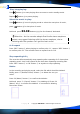
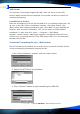
Enter into Music mode: Press M button ⑧ in standby mode to enter into main
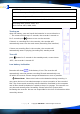
menu. Press or button ④⑤until the screen shows like picture (1) below.
Repress M button ⑧ to confirm and enter in music mode. Then the recorder
enters in Music standby mode, the screen shows like picture (2), if there is no
music file in the recorder, the screen shows like picture (3) and will return to the
main menu:
1 2 3