
User guide

Shining Technology CitiDISK HD Quick Usage Guide v9.0 Shining Technology CitiDISK HD Quick Usage Guide v9.0
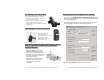
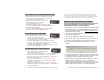
Mounting on the Hot-shoe
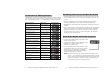
Attaching the Unit Across Belt
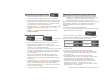
Mounting Between Shoulder-mount Camera
and G-/V-Mount Battery with Optional
Pocket Adapter
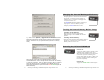
Modifying Device Configuration Setting
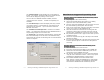
8). Click on the “Modify device configuration setting” button.
Make sure the Hardware ID shown is “Fw1256HD” and Product ID
is “Shining CitiDISK HD”.
The configuration setting comes preset and there is usually no
need to change it except the “User Config” sub-menu.
Click on “User Config” will display the next screen.
• Insert the CitiDISK HD to Hot-shoe
adapter( sold separately ) and secure
the unit it on hot-shoe
• Plug in the 4-pin FireWire connector
into the camcorder iLink port.
• Tighten the FireWire cable with handle
by cable-tie.
• Close both unit and
external battery
compartment, and connect
the FireWire cable.
• Run the flap across belt
and tighten it up.
• Slide the CitiDISK HD into the
PCKT1256 pocket adapter (item
not included and sold separately).
• Sandwich the pocket adapter with
the unit in between the camera’s
back and the battery.
• Connect the D-Tap power cord
between unit’s external power
input and one of the D-Tap
receptacles.
P4 P13