
Service manual




90
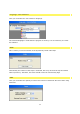
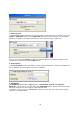
1. Select source:
In the Source window selected your desired image or video material, to do this click on the
Image / animation option in the Type of fill drop-down menu and then use the Folder
button to navigate to the folder that contains your required image or video file.
You can also select the Video A or B option and then import your desired image or video
material. To do this click on the Config button.
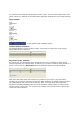
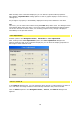
2. Pixel aspect:
In the Pixel aspect menu, the image or video material used can be reduced, enlarged and
left unchanged. The ratio aspect can also be modified.
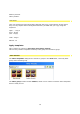
3. Attributes:
The Attributes field contains Flip options in a horizontal, vertical and diagonal
direction, and, of course, you can select the unchanged option, which means that no Flip
effect will be applied to the image or video material used.
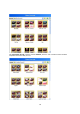
In addition, you can apply an Invert effect, which reverses the color values of the image,
video clip or template used.