
Service manual




8
Installation, Help, Registration, Technology and System
requirements
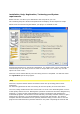
Either start the .exe file of your download or the setup file of your CD.
The remaining steps are shown and explained in the displays of the respective setups.
Please make sure that during installation your plug-in is installed as well:
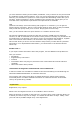
Should unexpected errors arise during installation, our support team can be contacted per
email directly from the setup process in order to analyze the error. Please only use this
option if an error occurs.
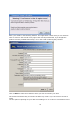
Vitascene can be started directly once the setup process is completed. You will then reach
the registration part of the program.
Help
Vitascene, Stylish transition effects and filters! 100% GPU processing power! 100%
interactive!
For discerning professionals who are looking for the best quality in the shortest time!
Of course, being multifunctional also means that it is much more demanding both in terms
of the quality and for the user. Although the operation of Vitascene has been designed very
intuitively, a certain period of familiarization is always required for high-performance
multimedia programs. We therefore recommend that you initially read this manual to get a
feeling for the program. You should definitely work through the tutorials. The worked
examples that are described there are specially tailored to help you learn how to use the
program and understand the systematic behind it. Only after completing the tutorials will