
Service manual


69
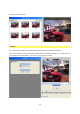
frame type is selected. If the result is slightly jerky, it may be necessary to change the
settings from Full frame to Half frame.
In some parameters of other cutting products these half frame settings have a different
name:
• Upper first = even
• Lower first = odd
Optimizing for video
This filter should always be selected if the end result is designed for video output.
Advantage: less picture interference, optimized color spectrum.
When the filter is switched off there is a speed advantage in calculating of about 20%, but
with this it brings a lower quality during video usage.
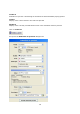
Rendering
This is where you can establish the format in which an animation will be used (AVI) and how
the Alpha channel should be controlled.
• RGB+Alpha computation (in a graphic): 24 Bit RGB color data as well as 8Bit alpha
channel data is stored in a file. The data can nevertheless be called up separately and is
not yet offset.
• RGB offset with alpha: 24 Bit RGB color data as well as 8Bit alpha channel data is stored
in a file (already offset).
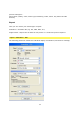
Export RGB-Stream as
This is where the animation output format (AVI) is determined.
File
This is where the path, together with the output folder, in which the individual image
sequence is issued, are determined.
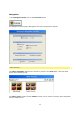
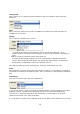
Codec
the codecs available are already checked on selection. Why? Some codecs do not register
correctly in the system. If the export process is then started, a system error appears that
looks as though Vitascene could not export with this codec. The real reason, however, is
usually an insufficient system integration of the codec - or of course a different alignment to
other media (e.g. special media players, etc.). If error checking brings up results these will
be shown in the codec's info window (codec does not support format, etc.)
Important: as some codecs transmit a default error code in this checking the real cause for
error can not always be determined correctly. Even an incorrect data path can cause an
export process to fail. Therefore, please always check the export path's validity (especially if
removable media, RAM discs, etc. are used).
Important Note:
Raw format : ideal for uncompressed animation files (AV) for usage in studios without
possible plug-ins. Supports RGB-A (inclusive of alpha channel!)