
Service manual



57
There will be no settings in the Location folder, as the position of the circle remains
centered.
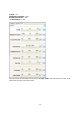
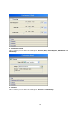
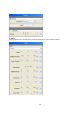
In the Filter folder select the following settings for the Sparkle effect.
Length = 10
Highlight-Threshold = 80%
Erosion-Threshold = 30%
Glow-Intensity = 100%
Orientation = 60%
and reduce flicker = 70%
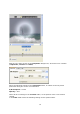
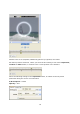
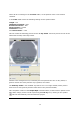
This will create the following preview for the 3. Key frame. Start the preview to look at the
effect with the help of the Play button.
Parallel to the enlarged circle (increased by the time passed since the 2
nd
Key frame) a
greater number and more powerful rays (Sparkle) are visible.
The End-Key frame is not modified any further as it is no longer visible (at this point in
time the circle has gone beyond the visible area of the preview window).
This completes creation of the Shape Wipe transition effect (as the basis for Sparkle Circle
Wipe #46).
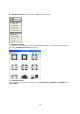
Simply return to Avid Liquid using the F12 key or by clicking on the symbol.
This will automatically save the Vitascene project.