
Service manual




149
•
Haziness
Using this option you can determine the intensity of the Dust effect (build up of haze or
mist).
•
Gamma
This setting option controls the effect on bright and dark areas within the image.
•
Glow-Intensity
The image is brightened, by adding a glow to the bright areas.
•
Highlight-Intensity
With this setting option, bright sections of images can be lightened or darkened.
•
Orientation
This allows the reflection direction to be changed within the image.
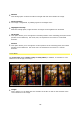
Color Composite
The Color Composite effect allows various color changes to be made within the image
material.
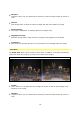
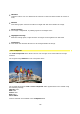
The original image without a Color Composite effect.
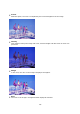
The example illustrations with a Color Composite effect applied have been created using
the following settings:
Opacity=70%,
Red=20%
Green=20%
Blue=80%
Fill as Plane
Various methods are available in the Composite field: