
Service manual




148
•
Gamma
This setting option controls the effect on bright and dark areas within the image.
•
Glow-Intensity
The image is brightened, by adding a glow to the bright areas.
•
Highlight-Intensity
With this setting option, bright sections of images can be lightened or darkened.
•
Horizontal
This option allows you to change the horizontal position of the vanishing point (the lowest
position of the reflection); the value (0%) corresponds to the centre in a horizontal
direction.
•
Vertical
This option allows you to change the vertical position of the vanishing point (the lowest
position of the reflection); the value (0%) corresponds to the centre in a vertical
direction.
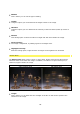
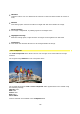
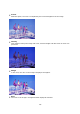
Cross Dust
The Cross Dust effect creates a hazy or misty effect, in addition, it simulates a cross
reflection in the image (crossways).
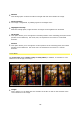
without Cross Dust with Cross Dust
•
Length
This is where you can determine the strength of the blur as well as the strength of the
cross-reflection in the image.