
Service manual




136
•
Alpha Edge
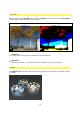
This is where the alpha channel is used, should there not be one the effect is applied to
the whole image. An edge is determined, to which the effect then relates.
•
negative Luminosity
This method alters the appearance of the Starburst effect, depending on the brightness.
However, only the dark areas of the image are used.
•
Bright Edge
An edge is determined in terms of brightness (tracing of bright edges only), to which the
effect then relates.
•
Saturation
This is where areas with a high concentration of color are altered in preference.
•
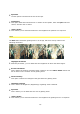
Maximum
This is where areas with a maximum level of colour are used; 100 % white has the same
effect as 100 % red, green, blue, magenta, yellow or cyan.
Further options for creating effects :
•
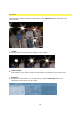
Threshold
This option determines when an effect begins, depending on the method used.
•
Method
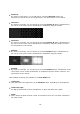
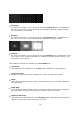
You have the following options for the number of rays or effect appearance:
12 Streaks
6+ Streaks
6 Streaks
4 Streaks
2 Streaks
Spot
You can decide on the appearance.
•
Orientation
This option determines the direction or rotation of the rays, when the Spot method is
chosen, direction has no effect.