
Service manual

127
•
Opacity
Enables you to determine the display strength of the effect.
•
Saturation
Enables you to determine the strength of the colors in the image.
•
Hue
Use this option to alter the shade of the color in the image.
Saturation Direction Bloom
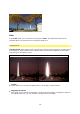
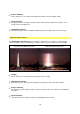
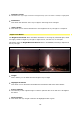
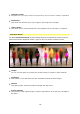
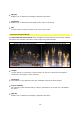
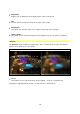
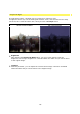
The Saturation Direction Bloom effect strengthens colored sections in the image material.
This effect also simulates reflections in the image using scattered light.
without Saturation Direction Bloom with Saturation Direction Bloom
•
Length
Use this option to increase the colored sections as well as to determine the length of
reflections in the image or video material.
•
Threshold
This enables you to determine the color threshold at which the effect begins.
•
Scene-Intensity
The intensity of the original image is used for optional dim-out as well as to strengthen
the effect.
•
Opacity
Enables you to determine the display strength of the effect.