
Operation Manual






50
Ulead COOL 3D 3.0
Token Move (G)
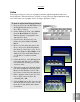
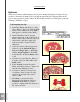
It’s easy to choreograph individual letters to move sequentially. This plug-in lets you do
this in any direction and in just a few steps. This tutorial shows you how to have indi-
vidual letters jut out at you for emphatic expression. (Settings: 30 frames, 15 fps)
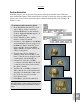
To apply the Token Move (G) effect:
1 In the EasyPalette file directory, select
Object Effects: Token Move (G), and
click the F/X button on the Attribute
Toolbar. Token Move (G) appears on the
Properties Menu.
2 On the Timeline Control, add a key
frame to frame 30 of the animation.
3 At frame 1 on the Attribute Toolbar, set
the Level of the animation to 0, Action
Sequence to Forward, Acceleration to
None, and Overlap to 30. Select the To
Origin option to make individual
characters return to their original
positions upon completing the specified
action.
4 Scroll down to the next level of at-
tributes. On this level are the coordi-
nates for position. To make the title
come towards you, enter -500 for Z
Value.
5 At frame 30, set the Level of the
animation to 100.
6 Click Play to preview the animation.