
Data Sheet





36
Note: Please pay attention to the assembling direction of OpenMV, or the arm will move to the opposite
direction. And make sure the OpenMV is disconnected with you PC or the IDE will control the
OpenMV.
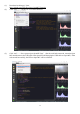
Step 7: Keep the table clean and non-reflective and get something with a lot of details like a PCB with
resistors.
Step 8 : Put the object in front of uArm Swift Pro about 25cm away,OpenMV will recognize the object.
Step 9: Connect the USB port and power port of uArm, press the power button of uArm. Open the Arduino
IDE (Download Arduino IDE https://www.arduino.cc/en/Main/Software), Choosing the right port: COM
(Arduino/Genuino Mega or Mega 2560)