
Specifications





37
http://www.tyan.com
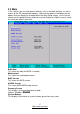
3.3 Main
In this section, you can alter general features such as the date and time, as well as
access to the IDE configuration options. Note that the options listed below are for
options that can directly be changed within the Main Setup screen. Users use the
arrow keys to highlight the item and then use the <PgUp> or <PgDn> keys to select
the value you want in each item.
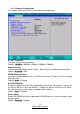
BIOS Date
This shows the date that BIOS is created.
Motherboard
This shows the motherboard name.
BIOS Version
This shows the BIOS version.
AGESA Version
This shows AMD AGESA code version.
Summary Screen
This displays system configuration on boot.
Options: Enabled / Disabled
System Memory
This displays the amount of system memory present on the system.