
- Truly Pic 'N RollDigital Photo & Audio Player User's Manual
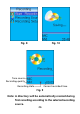
Table Of Contents
- I. Getting Started
- II. What does this button do
- III. Learning to use your MP310
- IV. USB Removable Disk
- V. Unplugging your MP310 from the PC safely
- VI. Installing, using and deleting your TRULY MP310 software
- VII. Frequently Asked Questions
- Technical Support
In the Main Menu, click “ ” and “ ” or
“VOL+” / “VOL–” to select the “Recording” icon
and press “ ” to confirm. Select “Starting
recording” and press “ ” to start. The blinking
Mic symbol indicates recording in process. The
letter “MIC” or “LINE IN” will display indicating
recording source.
Press “ ” to pause and press the same key
again to resume recording. Press “ESC / ” to
stop and save recording. If disk memory is full
during recording, a reminder message will be
displayed. At this time, Press “ ” or “ESC /
” to save the current recording and exit out of
the recording mode.
Recording Mode & Settings(III)
FM radio recording, voice recording (built-in
microphone), direct sound (LINE IN) and other high
quality recording are available in this player. Some
recording features are not available depending on
selected recording quality.
/
/
/
1. Using the MP310 recording function
/
25