
User's Manual


48
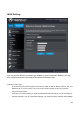
QoS Setting
There are several Maximum upload bandwidth to choose or user defined. QoS is enabled by default. You
can disable it in the QoS Setup screen by clearing the Enable check box
Traffic Class Setting
User could select the Low/Mid/highest priority that this port’s traffic should receive relative to other
applications and traffic when accessing the Internet.
Inbound class Setting
For user to limit downlink bandwidth
Outbound Class Setting
For user to limit Min/Max uplink bandwidth
QoS Rule Add