
Installation Manual

ENGLISHFRANÇAISDEUTSCH
ESPAÑOLРORTUGUÊS
12
Phase 4: Confirm Connectivity
1. Leave your computer connected to TEW-740APBO #2 and keep the web management
interface open.
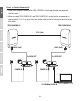
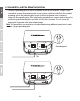
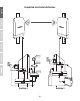
2. Make sure both TEW-740APBO #1 and TEW-740APBO #2 access points are powered on
approximately 15 ft. (5 m) apart from one another with front of access points directly facing
each other.
15 ft. (5m)
LAN1 (PoE)
P+DATA OUT
POWER IN
P+DATA OUT
10/100Mbps DATA IN
TEW-740APBO #1 TEW-740APBO #2
LAN1 (PoE)
POWER IN