
User's Manual




Microsoft VPN
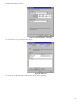
Figure 53: Filter Properties: Addressing
8. Enter the Source IP address and the Destination IP address.
• Since this is the outgoing filter, the Source IP address is "My IP address" and the Destination IP address is the address range
used on the remote LAN.
• Ensure the Mirrored option is checked.
9. Click "OK" to save your settings and close this dialog.
Figure 54: New Rule Properties: IP Filter List
10. On the resulting screen (above), ensure the "To DUT" filter is selected, then click the Filter Action tab to see a screen like the
following
87