
User's Manual




Broadband VPN Gateway User Guide
Schedules
• Blocking will be performed during the scheduled time (between the "Begin" and "End" times.)
• Two (2) separate sessions or periods can be defined.
• Times must be entered using a 24 hr clock.
• If the time for a particular day is blank, no action will be performed.
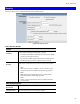
Schedules Screen
This screen is accessed by the Schedules link on the Firewall menu.
Figure 37: Schedules Screen
Data - Schedules Screen
Day
Each day of the week can be scheduled independently.
Time Interval 1
Time Interval 2
Two (2) separate sessions or periods can be defined. Session 2 can be
left blank if not required.
Begin
Enter the start using a 24 hr clock.
End
Enter the finish time using a 24 hr clock.
60