
Operation Manual



Trend Micro™ ServerProtect™ Getting Started Guide
2-22
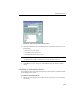
FIGURE 2-17. The ServerProtect Installation Path Selection screen
10. To locate an Information Server do one the following:
• Type the name or IP address of the Information Server in the text box below
the tree. Click Find Server.
• Double-click the target machine for the Information Server in the browser tree
Click New Domain if you want to create a new ServerProtect domain.
Note: If an Information Server resides on a network different from that of the Normal
Server, the server may not appear in the list. In this case, it may be necessary to
type its server name or the IP address in the Information Server field to locate
it.
11. Click Next. The Input ServerProtect Information Server password screen
appears.