
Operation Manual



Installing ServerProtect
2-21
6. Select the installation path for your Normal Server, and then click OK. To create
a new folder, click New Folder and then click OK.
7. Click Next in the Select Components screen. The Input Logon Information
screen appears. See Figure 2-7.
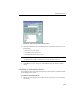
For NetWare Normal Servers, specify a communication protocol in the Select
Components screen, and then click Next to go to the Input Logon Information
screen. See Figure 2-16.
FIGURE 2-16. Select Components window
Note: If you select IP, type the fixed IP address of the target server, and then click
Next.
8. Under Logon Information, type the appropriate data next to the Domain name,
User name, Password, and Confirm Password fields.
9. Click Next, the ServerProtect Installation Path Selection screen appears.