
Operation Manual



Trend Micro™ ServerProtect™ Getting Started Guide
2-20
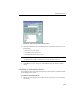
FIGURE 2-14. ServerProtect Install Path Selection screen
3. Click the appropriate network to expand the tree, and then click the target server.
4. Click OK. The Enter Password window appears.
FIGURE 2-15. ServerProtect Target Server Logon window
5. Type an administrator user name and password to access the target server, and
then click OK. The target server’s local drives appear on the tree.