
Operation Manual



Installing ServerProtect
2-19
Installing a Normal Server from the setup program
The setup program allows you to install a Normal Server both locally and remotely to
your network.
Note: Before you set up a NetWare server as a Normal Server you must have a functional
Information Server. The Information Server can only be installed on a Windows
Server 2003/2000/NT machine.
To install a Normal Server from the setup program:
1. Execute the setup program and provide the necessary product information.
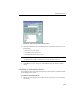
2. Select the Install server as a ServerProtect Normal Server check box on the
Select Components screen. See Figure 2-6.
Click Browse to locate the target server and folder where you want to install a
Normal Server. The ServerProtect Install Path Selection window appears.