
Operation Manual



Installing ServerProtect
2-17
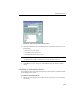
FIGURE 2-11. ServerProtect Setup Information Server screen
6. Type a password. This prevents unauthorized access to this Information Server
from either the Management Console or the setup program.
7. Click Next. The Start Copying Files window appears. Verify the information
listed on the screen.
8. Click Next to continue with the setup program. ServerProtect now starts copying
all program components and starts all services. After all program components
have been copied and all services have started successfully, the Setup Complete
screen appears.