
Operation Manual



Trend Micro™ ServerProtect™ Getting Started Guide
2-14
3. If you want to be the only one to view the ServerProtect program from the
Windows Start menu, click Personal program folder. Otherwise, click
Common program folder. Click OK. The Start Copying Files window
appears.
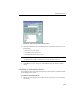
4. Click Next to continue with the setup program. Setup starts copying all program
components and starts all services. After all program components have been
copied, the Setup Complete screen appears.
FIGURE 2-8. ServerProtect Setup Complete screen
5. Click Finish. The Select an Information Server window appears.