
Full Product Manual





Battery Replacement:
THERE ARE TWO TYPES OF BATTERY LOCATIONS
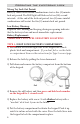
TYPE 1: DROP DOWN BATTERY COMPARTMENT:
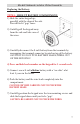
1) Feel around the bottom right side of the keypad for a black
plastic latch and compartment. If you don’t feel or see this latch
or compartment then use the instructions for Type 2 on next page.
2) Release the latch by pulling the lever downward.
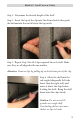
3) Pull down and remove the battery compartent from the bottom
of the keypad.
4) Remove the old battery and then press and hold each number
on the keypad for 5 seconds each.
5) Replace the battery with a new 9-volt alkaline battery with a
“use date” of at least 5 years in the future.
6) Put the battery compartment back into the keypad. Push it up
until it is in line or level with the cover. Press the latch/lever into
the keypad to lock the compartment in place.
Low Battery Warning:
Repeated LED ashing and beeping during an opening indicates
that the battery is low and needs immediate replacement.
Wrong Try Lock Out Period:
Four (4) consecutive invalid combinations starts a ve (5) minute
lock out period. e LED light will ash red at ten (10) second
intervals. At the end of the lock out period, two (2) more invalid
combinations will restart the ve (5) minute lock out period.
6
Operating the electronic Lock