Computer Drive User Manual
Manuals
Brands
Toshiba Manuals
Computer Hardware
TRANSMEMORY U2M-008GT
17
18
19
20
21
22
23
24
25
26
USB Flash
Me
m
ory
U2M Secu
rity
Softw
are I
nsta
llation
Manual
24
4)
W
hen
the
“Old
Password”,
“New
Password
”,
“Confirm
New
Password”,
a
nd
“Hi
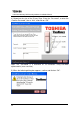
nt” have been entered, click on “OK”.
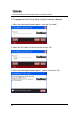
5) W
hen the fol
lo
w
in
g dia
log
box appears, confirm
and cli
ck on “OK”.
1
...
...
22
23
24
25
26