
- TOA Digital Video Recorder Operating Instructions

91
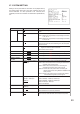
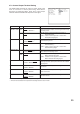
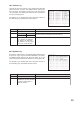
MA I L SE T T I NG
SENDER ADDRESS t e s t
SEND–TO ADDRESS1 t es t 1
SEND–TO ADDRESS2 t es t 2
SEND–TO ADDRESS3 t es t 3
SEND–TO ADDRESS4 t es t 4
SMTP SERVER smtp.ne. jp
POP3 AUTHENT I CAT I ON ON
ENCRYPT I ON OFF
ACCOUNT NAME us e r 5 5 5
PASSWORD pass555
POP3 SERVER pop3.ne. jp
TRANSMI SS ION SETT I NG
TEST TRANSMI SS I ON EXECUTE
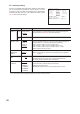
Item
SENDER ADDRESS
Description
Set the Digital Video Recorder’s email address.
Selection
Up to 46 alphanumeric
characters
Up to 46 alphanumeric
characters
SEND-TO
ADDRESS 1
-
4
Set destination Email address.
Up to 46 alphanumeric
characters
SMTP SERVER Set the SMTP server’s IP address
EXECUTE
POP3 AUTHETICATION
ON: Authentication by POP3 when transmitting emails.
OFF: No POP3 authentication when transmitting emails.
ON:
Encrypts user names and passwords during POP3 authentication.
OFF: User names and passwords not encrypted during POP3
authentication.
ON / OFF
ON / OFFENCRYPTION
Set account names for POP3 authentication. Up to 23 alphanumeric
characters
Up to 23 alphanumeric
characters
Up to 46 alphanumeric
characters
ACCOUNT NAME
PASSWORD Set password for POP3 authentication.
POP3 SERVER Set POP 3 server’s IP address.
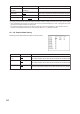
TEST TRANSMISSION
Performs test transmission using the current settings.
TRANSMISSION SETTING
For setting, refer to p. 92; Transmission condition setting.
Note:
Underlined settings represent factory-preset settings.
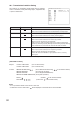
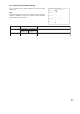
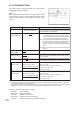
FROM ADDRESS
test
01234 56789
ABCDE FGH I J
KLMNO PQRST
UVWXY Z
abcde f ghi j
klmno pqrst
uvwxy z
!”#$% & ()
+,
-
./ :;<=>
?@^ _ ` { | } ~ D EL END
0
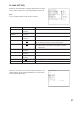
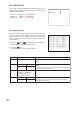
26. MAIL SETTING
Emails can be transmitted to receiving address when an alarm
event or failure occurs. Up to 4 receiving addresses can be set.
Note
It is not possible to attach screen shots to sent mail.
Follow the procedures in the Camera Name Settings to set
sender address, send-to address, SMTP server, account name ,
password and POP3 servers.