
User Guide

5
SETTING YOUR PERSONAL DATA
ConguringyourpersonalinformationinSetupmodeiscriticaltomakesureyougetthemostaccurate
data from the Health Touch
™
Plus watch. Your age, gender, weight, height, and stride length are used to
calculate distance, pace, and calories burned. The target heart rate zone limits make sure that you are
operating at maximum efficiency for your chosen fitness goals.
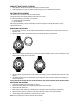
1. PressMODEuntilSETUPdisplays.
2. PressSTART/STOP/RESET(-)untilPERSONdisplays.
3. HoldSETuntilAGEdisplays.
4. PressINDIGLO
®
button(+)andSTART/STOP/RESET(-)tosetyourage.
5. PressMODEuntilGENDERdisplays.
6. PressINDIGLO
®
button(+)andSTART/STOP/RESET(-)toselectMALEorFEMALE.
7. ContinuepressingMODE,INDIGLO
®
button(+),andSTART/STOP/RESET(-)tosetuppertargetzonelimit,
lower target zone limit, weight, height, and stride length.
8. PressSETtoexit.
SETTING STRIDE LENGTH MANUALLY
Bydefault,stridelengthiscalculatedautomaticallybasedonyourgender,weight,andheight.Ifthedistance
recorded by the watch does not match the distance you have actually traveled, you can set the stride length
manually for more accurate measurements.
Ifthedistancesmeasuredbythewatchareshorterthanthedistancestraveled,increaseyourstridelength
setting.Ifthedistancesmeasuredbythewatcharelongerthanthedistancestraveled,decreaseyourstride
length setting.
1. AccessPERSONsettings,andthenpressMODEuntilSTRIDEdisplays.
2. PressINDIGLO
®
button(+)toselectMANUAL,andthenpressMODE.
3. PressINDIGLO
®
button(+)andSTART/STOP/RESET(-)toadjustyourstridelength.
4. PressSETtoexit.
GETTING YOUR HEART RATE
You can use the Health Touch
™
Plus contact heart rate monitor to measure your heart rate and compare it to
the target heart rate zone limit you set when you configured your personal data.
Whenyouacquireyourheartrate,thewatchwillalertyouifyourmeasuredheartrateisoutsideofyourtarget
zone.Amessagewillalsotellyouwhetheryourheartrateisaboveorbelowyourtargetzone,promptingyou
to intensify or relax your efforts to stay in-zone.
Youcanacquireyourheartrateatanytimeinanymode.
Ifyoumeasureyourheartratewhileaworkoutisactive,thedataisfactoredintotheaverageheartratefor
theworkout.Whenyouresettheworkout,thisaverageissavedandyoucanviewitinReviewmode.See
REVIEWMODE.
1. Strapthewatchsnuglyaroundyourwrist.
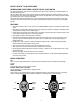
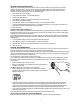
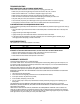
2. Withyourindexnger,touchthesteelringaroundthewatchface
for about 5-8 seconds.
The
g icon flashes while your heart rate is measured.
3. Whenmeasurementiscomplete,yourcurrentheartrateisdis-
played in beats per minute and as a percentage of your estimated
maximum heart rate.
• Ifyourheartrateislessthanthelowerlimitofyourtargetzone,thewatchbeepstwiceandZONE-LO
displays.Increaseyourworkoutintensitytoraiseyourheartrateabovethelowertargetzonelimit.
• Ifyourheartrateismorethantheupperlimitofyourtargetzone,thewatchbeepstwiceandZONE-HI
displays. Relax your workout intensity to lower your heart rate below the upper target zone limit.
• Ifyourheartrateiswithinthetargetzone,ZONE-INdisplays.Maintainyourworkoutintensitytostayinthe
target zone you have set.
Ifyouhaveproblemsacquiringaheartratemeasurement,seeTROUBLESHOOTING.
LOCKING AND UNLOCKING THE HEART RATE MONITOR
Ifyouareinverywetconditions,youcanlocktheheartratemonitortopreventfalsereadings.