
User Manual






Network Settings
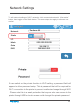
If user switch on the private function in Wi-Fi setting, a password field will
appear to allow passowrd setup. This is password that will be required for
Wi-Fi connection to the printer to prevent unathorized usage through Wi-Fi
. Please note this is a weak protection that anyone who can access to the
printer through USB or touch screen could changet the private password.
25
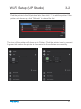
To edit network settings of Wi-Fi networks, click connnected network’s “Information”
button, then toggle on the Static button. The same steps also apply to ethernet con-
nection.
400
34°C | 34°C
Mask
I.P.
Static
Network
Gate
Tiertime
192.168.7.111
255.255.255.255
192.168.7.1
Tiertime-02
192.168.1.253
DNS