
User Manual

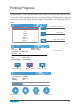





Manage Print Queue
Back to Main Menu
Start Printing Delet Print Job Back to Print
Print Settings
Printing Progress
Pressing the “Print” button in the main menu will bring up the Print Job
Current List the same as the one in the software. Clicking the name of
each print job will bring up the detail information of the print job for
print
.
20
History
1/ 4
499
Next Page
Infill:
Material:
ABS
Layer Thk.:
Quality:
Normal
0.2
Time/ Weight:
1h10m20s/ 135g
File Name:
Cube
Creator:
Tiertime-1
Total Time/Weight:
1h27m30s/200g
Date:
04-18 12:11:46
PrintDelete
499
34°C | 34°C
Sphere
Model- 3
Sphere- 1
Model- 4
Car
Cube
Model- 1
Cylinder
History
1/ 4
499
34°C | 34°C
StopPause/ Resume ExtrudeWithdraw
400
210°C | 70°C
1h10m20s
Time Remaining:
File Name:
ABS, 135g
Material:
Cube
30%