
Operation Manual





- 9-
Opt for one of the two SIMs or choose “Always ask”. If you
choose the first option by setting the default SIM, when you
dial a call, the name of the operator appears on the
notifications bar at the upper left of the screen. Simply
drag down the notification bar to select the other operator
if necessary. Otherwise, if you choose the “Always ask”
option, the phone will ask you to confirm which operator to
use each time you make a call or send an SMS/MMS.
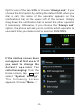
If the startup screen does
not appear at first use or if
you want to change the
d e f a u l t o p e r a t o r f o r
calls/messaging: from the
Home screen, tap and
select “System settings”.
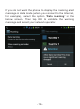
T h e f o l l o w i n g s c r e e n
appears. Choose “More...”.