
Operation Manual






91
E-DOC-CTC-20050429-0103 v2.0
Chapter 4
SpeedTouch™ Web Interface
4.6.5 Access Point Settings
Accessing the Access
Point settings
Proceed as follows:
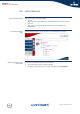
1 On the left menu, click Home Network.
2 Under Wireless, click the name of the Access Point you want to view or
configure.
Overview The Overview page displays a brief overview of the current configuration.
Details The Details page displays a more detailed overview of the current configuration.
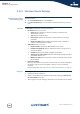
Configure Under Configuration following fields are available:
Interface Enabled:
Allows you to enable/disable the wireless interface.
Physical Address:
Displays the Base Service Set Identifier (BSSID) of the selected Access Point.
Network Name (SSID):
Allows you to change the network name of your WLAN.
Interface Type:
Allows you to choose between:
802.11b
802.11b(legacy)/g
802.11b/g
802.11g
Actual Speed:
Displays the current transmission speed.
Channel Selection:
Allows you to select a fixed channel or let the SpeedTouch™ automatically
select a channel for you.
Region:
Displays your region.
Channel:
Displays the channel that is currently used by the Access Point.
Allow multicast from Broadband Network:
Allows you to allow/deny multicast messages from the Internet.
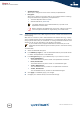
Under Security following fields are available:
Broadcast Network Name:
By default the SpeedTouch™ broadcasts its network name, allowing you to
easily recognise your wireless network in the list of available networks. Once
you have configured your wireless clients, it is recommended to disable this
feature by clearing this check box.
The Access Points names are of the following format: “WLAN: “ +
Network Name, for example “WLAN: SpeedTouch123456”.
Large bandwidth streams like video streams, have a large impact on
your wireless performance.