
Operation Manual





17
E-DOC-CTC-20050429-0103 v2.0
Chapter 1
Your SpeedTouch™
1.3.4 Remote Assistance
Remote access You can make your SpeedTouch accessible from the Internet with regard to remote
support. This way, you can allow your helpdesk to access your SpeedTouch™
remotely.
Enabling remote access To enable remote assistance:
1 Go to the SpeedTouch™ pages, as described in “1.3.1 Access via the Web
Interface” on page 11.
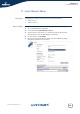
2 In the menu select Toolbox > Remote Assistance.
3 Click Enable Remote Assistance.
4 Provide the following parameters to your helpdesk:
URL (the HTTPs link)
User name
Password
5 Your ISP is now able to access your SpeedTouch™ via the secure HTTPs link in
combination with the provided certificate (a secure authentication mechanism).
Disabling remote
access
To disable remote assistance:
1 Go to the SpeedTouch™ pages, as described in “1.3.1 Access via the Web
Interface” on page 11.
2 In the menu select Toolbox > Remote Assistance.
3 Click Disable Remote Assistance.
For security reasons, after 20 minutes of inactivity, or on reboot, Remote
Assistance will be automatically disabled.