
Operation Manual





8
E-DOC-CTC-20050429-0103 v2.0
Chapter 1
Your SpeedTouch™
1.2 SpeedTouch™ LED Behaviour
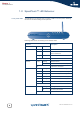
Front panel LEDs The SpeedTouch™ is equipped with a number of LEDs on its front panel, indicating
the state of the device during normal operation.
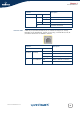
Following table shows the meaning of the different LEDs:
Indicator Description
Name Colour State
Power Green On Power on, normal operation
Red On Power on, self-test failed, indicating
device malfunction
Orange On Bootloader active
Off Power off
Ethernet Green Flashing Ethernet activity
On Ethernet connection, no activity
Off No Ethernet connection
WLAN Green Flashing Wireless activity, WPA encryption
On No wireless activity, WPA encryption
Amber Flashing Wireless activity, WEP encryption
On No wireless activity, WEP encryption
Red Flashing Wireless activity, no security
On No wireless activity, no security
Off WLAN disabled
DSL Green Flashing Pending DSL line synchronisation
On DSL line synchronised
Off No DSL line
Power
Ethernet
WLAN
DSL
Internet