
Operating Instructions and Installation Instructions


Chapter 2
Basic Installation
19
E-DOC-CTC-20051017-0035 v1.0
2.4 SpeedTouch™ Connection Essentials
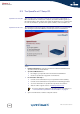
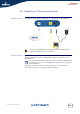
SpeedTouch™ wiring The image below shows all possible types of connection to the SpeedTouch™.
Making connections In most cases, the SpeedTouch™ Quick-Install Wizard and Home Install Wizard will
guide you through the process of making all the required connections to your
SpeedTouch™.
If you want to make the required connections yourself, see “2.5 Connections
Overview and Powering” on page 20 for more information.
The colour coded printing on the backpanel of your SpeedTouch™ will
facilitate matching the colour coded cables.
DSL Reset ON/OFFEthernet
It is recommended to wait to make any of these connections until the wizard
prompts you to do so. See “2.2 Installing your SpeedTouch™” on page 7 for
more information.