
Operation Manual



CD SECTION
Channels: 2 channels
S / N ratio: 60 dB
Wow & Flutter: undetectable
Samplingfrequency: 44.1kHz8xoversampling
Quantization: 1 bit DA converter
Pickuplightsource: Semi-conductorlaser
Pickupwavelength 790nm
BLUETOOTH SECTION
Bluetooth standard Bluetooth Standard Version 2.1 + EDR
Range:10m(freespace)
RADIO SECTION
Tuning ranges: FM 87.5 - 108 MHz
Antennas: FM Rod antenna
GENERAL
Output power: 1.5 W + 1.5 W (RMS)
Power consumption: 11 W
Aux In Jack: 3.5 MM
Phones Jack: 3.5 MM
SPECIFICATIONS
CLEANING CD
IftheCDskipsorwillnotplay,thediscmayneedcleaning
.Beforeplaying,wipethedisc
from the centre out with a
cleaningcloth.Afterplaying,
store the disc in its case.
MAINTENANCE
CLEANING THE CD LENS
If the CD lens is dusty, clean it with a brush-blower. Blow
several times on the lens and remove the dust with the
brush.Fingerprintsmayberemoved with acottonswab
moistened with alcohol.
CLEANING THE UNIT
Donotusevolatilechemicalsonthisunit.Cleanbylightly
wipingwithasoftcloth.
IMPORTANT NOTE
Ifanabnormaldisplayindicationoranoperatingproblem
occurs, disconnect the AC power cord and remove the
batteries. Wait at least 5 seconds, then reconnect the AC
power cord or reinstall the batteries.
WARNING
ShouldtheCDdoorbeopenedbeforethereadingoftheCD
iscompleted,ajammingnoisemayoccur.Thisisresolved
byclosingtheCDdoor.
BLUETOOTH OPERATION
- Next time you switch on the unit, the speaker connects to the last paried device automatically.
- Themusicstreamingmaybeinterruptedbyobstaclesbetweenthedeviceandtheunit,suchaswalls,orotherdevices
nearbythatoperateinthesamefrequency.
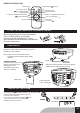
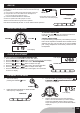
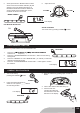
2. Press the FUNCTION button to
select BLUETOOTH. The " BT " is shown on the display.
3 . On your Bluetooth device, activate
Bluetooth and search for F-6188.
The bluetooth LED indicator
ashesduringpairing.
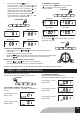
4. Connected:BluetoothLEDindicatorisalwayslight
on.
5. After successful coonection,start music play on the
Bluetooth device.
Unit will be automatically off after 15 mins without further operation.
LCD display
POWER
1 . Turn on the unit by
pressingthePOWERbutton.
BLUETOOTH
FUNCTION
GB9