
Operation Manual
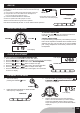



FOLDER UP / DN
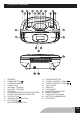
- Press FOLDER UP or FOLDER DN ( on remote ) button to
select desired folder.
- Press B-SKIP / DOWN button or F-SKIP / UPB-SKIP / DOWN button or F-SKIP / UP
button to select desired track.to select desired track.
-PressPLAY/PAUSEbuttontostartplaying.
FOR NORMAL COMPACT DISC PLAYBACK
Programmedplaybackenablestracksonadisctobeplayedinthedesiredorder.Up
to20trackscanbeprogrammed.
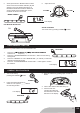
1. Press the “ PROGRAM/REPEAT/CLOCK-ADJ. “ button.
2. Press the skip buttons to select the desired track number.
3. Press“PROGRAM/REPEAT/CLOCK-ADJ.“buttonagaintomemorizethetrack.
4. Repeatsteps2and3untilalldesiredtracksareprogrammed.
5. Press the “ PLAY/PAUSE “ button to start. “ PROGRAM “ is shown on
the LCD display.
6. Press“STOP“buttontostopprogrammedplayback.
7. Press “ PROGRAM/REPEAT/CLOCK-ADJ. “ and “ PLAY/PAUSE “ buttons to
resumeprogrammedplayback.
8. TurnofftheCDplayertocleartheprogrammedmemory.
FOR MP3/WMA/USB PLAYBACK
Programmedplaybackenablesfolders/albumsortracksonadisctobeplayedinthe
desiredorder.Upto20folders/albumsortrackscanbeprogrammed.
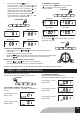
1. Press the “ PROGRAM/REPEAT/CLOCK-ADJ. “ button.
2. Press the FOLDER UP button to select the desired folder.
3. Press the skip buttons to select the desired track number.
4. Press“PROGRAM/REPEAT/CLOCK-ADJ.“buttonagaintomemorizethetrack.
5. Repeatsteps2to4untilalldesiredtracksareprogrammed.
6. Press the “ PLAY/PAUSE “ button to start. “ PROGRAM “ is shown
on the LCD display.
7. Press“STOP“buttontostopprogrammedplayback.
8. Press “ PROGRAM/REPEAT/CLOCK-ADJ. “ and “ PLAY/PAUSE “ buttons to
resumeprogrammedplayback.
9. TurnofftheCDplayertocleartheprogrammedmemory.
Note :Programmingcanonlybemadewhentheplayerisinstopmode.
PROGRAM CD/USB
CD display
MP3/WMA/USB display
PROGRAM
PROGRAM
USB OPERATION
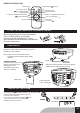
1. Connect USB disk or MP3 player into the USB port.
2. Press FUNCTION button to select USB.
3. Press PLAY/PAUSE button to start playback.
note:
USB connector does not support connection with USB extension cable and
itisnotdesignedforcommunicationwithcomputerdirectly.
Manufacturer is not responsible for the playability of USB disk or MP3 player
duetorecordingcondition,capacity,interfacecompatibility,etc.
Duetodifferentformats,someUSBdisksorMP3playersmaytakelongertimetoberead.
USB stick is direct connected or with a cable with max. 0,5 m length.
USB display
Unit will be automatically off after 15 mins without futhur operation (in stop mode).
FUNCTION
FOLDER UP
GB8