
Operation Manual
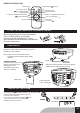
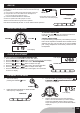



TO SKIP TO THE BEGINNING OF A TRACK
• Presseitheroneoftheskipbuttonsaccordingtothedesired
skip direction.
• Play/back resumes from the selected track.
• Whenthebuttonispressedonceduringplay,theprevioustrackstartsagain.
• Whenthebuttonispressedonceduringplay,thenexttrackplays.
SEARCHING FOR A PASSAGE WITHIN A TRACK
• Keeptheorbuttonpressedduringplayback,
andreleasethebuttonassoonasyourecognisethedesired
Unit will be automatically off after 15 mins without further operation (in stop mode / CD door open).
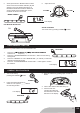
TO INTERRUPT PLAYBACK
Press the Play/Pause button and the symbol
""willash.Pressthebuttonagainto
resume playback.
USB display
CD display
MP3 display
WMA display
6. Press the PLAY/PAUSE button.
Track number "01" ," CD "& the symbol " " will
beshownduringnormalcompactdiscplayback.
Track number "001"," CD ", the symbol " " &
"MP3"willbeshownduringMP3playback.
Track number "001"," CD ", the symbol " " &
"WMA"willbeshownduringWMAplayback.
Track number "001", the symbol " " & "USB"
willbeshownduringUSBplayback.
USB display
CD display
MP3 display
WMA display
TO STOP PLAYBACK
Press the STOP button and the display shows the
total tracks of the disc.
PLAY/PAUSE
PLAY/PAUSE
STOP
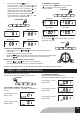
REPEAT , REPEAT ALBUM PLAYBACK
FOR NORMAL COMPACT DISC PLAYBACK
Mode sequence REPEAT FLASHED >> REPEAT >>
CLEAR.
DuringRepeat1mode,
display shows
DuringRepeat2mode,
display shows
PressREPEATbuttonduringCD playback.
CDplayswithasingletrackrepeat,alltracksrepeat.
REPEAT
FOR MP3/WMA PLAYBACK
ModesequenceREPEAT FLASHED >>
REPEAT FOLDER FLASHED >> REPEAT >> CLEAR.
DuringRepeat1mode,
display shows
DuringRepeat2mode,
display shows
DuringRepeat3mode,
display shows
GB7