
Operation Manual
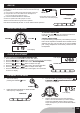



FOR BETTER RECEPTION
6. Adjust the sound.
LCD display
5 . At FM, press FM ST. / MONO button to select
stereo sound.The FM stereo indicator (St) will
appear on the LCD display panel when an
FM Stereo Broadcast is received. When FM
signalisweakandsounddistortionoccurs,
it is better to select mono sound.
MONO/ STEREO
VOLUME VOLUME
FM
AFTER LISTENING
TurnofftheunitbypressingPOWERbutton.
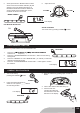
COMPACT DISC PLAYBACK
POWER
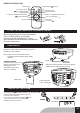
1 . Turn on the unit by
pressingthePOWERbutton.
FUNCTION
2 . Press the FUNCTION button to
selectCD.Thesymbol"___"ashes
forsearchingCDdisc.
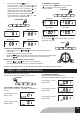
Maximum 20 preset stations can be memorized in FM
1. Press the " F-SKIP/UP or B-SKIP/DOWN " button toF-SKIP/UP or B-SKIP/DOWN " button to" button to
selectthedesiredfrequency.
2. Pressthe"PROGRAM/REPEAT/CLOCK-ADJ."buttontoentertuning
savingmode.
3. Press the " MEMORY UP "OR " MEMORY DN " ( on remote ) to select the
desired programmednumber.
4. Pressthe"PROGRAM/REPEAT/CLOCK-ADJ."buttonagaintoconrm
the selection.
RADIO MEMORY FUNCTION
PROGRAM
LCD display
LCD display
3. OpentheCDdoorbypushingOpen/CloseCD
button.
4. Insertadiscwiththelabelsidefacingup.
5 . Close the CD door.
The disc will rotate and
the total tracks of the disc
will show on the display.
GB6