
Operation Manual



AUX. IN
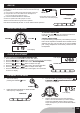
AUX. IN
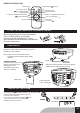
An external (auxiliary) audio source (i.e., personal CD player
orMP3player)canbeconnectedtothisunitandheardthrough
the speakers.
1) PlugoneendofcableintotheAUXINsocketontheunit.
2) PlugtheotherendofthecableintotheHeadphoneor
Line Out socket of the external source.
3) Press the FUNCTION button to select AUX.
Continue to operate CD or MP3 player as usual.
Selectionswillbeheardthroughtheunit'sspeakers.
(Plugotherendintoexternal
source such as an MP3 player.)
Unit will be automatically off after 4.5 hours without further operation.
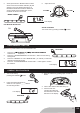
ADJUSTING THE SOUND
LCD display
VOLUME VOLUME
The clock is displayed on LCD display at standby mode.on LCD display at standby mode.
1. Press and hold the PROGRAM / CLOCK-ADJ. button.
2. Press the NEXT or BACK to select 12 hours or 24 hours display.
3. PressthePROGRAM/CLOCK-ADJ.button,the hour digit ash.thehourdigitash.
4. PresstheNEXTorBACKtoadjusthourdigit.
5. PressthePROGRAM/CLOCK-ADJ.button,theminutedigitash.
6. PresstheNEXTorBACKtoadjustminutedigit.
7. PressthePROGRAM/CLOCK-ADJ.buttonagain,thecorrecttime
is shown on display.
CLOCK ADJUSTMENT
CLOCK-ADJ.
LCD display
POWER
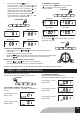
LISTENING TO THE RADIO
1 . Turn on the unit by
pressingthePOWERbutton.
LCD display
LCD display
FUNCTION
FUNCTION
2 . Press the FUNCTION button to select the radio
and frequencyisdisplayed.
TO ADJUST THE VOLUME
Press the VOLUME button to increase the volume or
VOLUME button to decrease the volume.
STEREO HEADPHONES
Forprivatelistening,headphones(notincluded)ofnotless
than8ohmsimpedanceandttedwithastandard3.5mm
diameter jack plug, may be tted tothe front PHONES
jack. Using headphones automatically switches-off the
loudspeakers.
3. Tunetoastationbypressingandholdingthe
F-SKIP/UP or B-SKIP/DOWN button and theF-SKIP/UP or B-SKIP/DOWN button and theand the
frequencyisdisplayed.
4. Releasethebuttonassoonasthesearching
starts. The tuner will search up or down and stop
atthenextreceivablestation.Whenscanning
stops,thefrequencyofthereceivedstationwillbe
displayed.
GB5