
User's Manual





55
•Relocate the base. Make sure base is not plugged into an outlet with
another household appliance.
• Charge the battery.
Unit beeps
• Place the handset in the cradle for 20 seconds. If it still beeps, charge
battery for 16 hours.
• Clean charging contacts on cordless handset and base/charge cradle
with a soft cloth or an eraser.
•See solutions for “ No dial tone.”
•Replace the battery.
Memory Dialing doesn't work
• Did you program the mem ory correctly?
• Did you follow proper dialing sequence?
Unit show s
SEARCHING
or
OUT OF RANGE
• Unplug the handset battery and plug it in again after 1 m inute.
• Unplug the base power converter and plug it in again after 1 m inute.
Unit locks up and no com m unication between the base and cordless handset
• Unplug the power converter from the electrical outlet and the back of
the base/charge cradle. Remove the handset battery. Wait for 30
seconds and plug the power converter back into the base/charge cradle
and electrical outlet. Reconnect the battery and charge for 16 hours.
Re-register the handset.
Cannot register extra handset
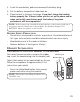
. During registration, press and hold the page/int button on the base of Model 25895 or
the page button on the base of Model 25825 or 25826 until you hear a long beep.
Then follow the steps listed in session HANDSET REGISTRATION.
. If no long beep tone is emitted but in use/charging LED is blinking indicates that the
base can no longer be in the registration mode. It has fully occupied with the
maximum number of handsets (i.e., 4). To register a new handset, you need to do a
Global De-registration. Please follow the steps listed at the end of the
session HANDSET DE-REGISTRATION.