
User's Manual





51
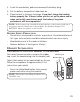
4. Insert the new battery pack and reconnect the battery plug.
5. Put the battery compartment door back on.
6. Place handset in the base to charge. If you don’t charge the handset
battery properly (for 16 hours) when you first set up the phone and/or
when you install a new battery pack, the battery’s long-term
performance will be compromised.
NOTE : If the battery is not in stalled in the handset or the battery pack is not
properly conn ected inside the compartment, th e h andset displays “NO
BATTERY” when it is placed on th e cradle.
BATTERY SAFETY PRECAUTIONS
• Do not burn, disassemble, mutilate, or puncture. Like other batteries of
this type, toxic m aterials could be released w hich can cause injury.
•Keep batteries out of the reach of children.
•Rem ove batteries if storing over 30 days.
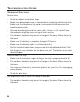
HEADSET INSTALLATION
CONNECTING AN OPTIONAL HEADSET TO THE HANDSET
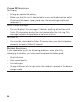
For hands free conversation, remove the rubber
cap, insert the headset plug into the headset jack.
Adjust the headset to rest com fortably on the ear.
Move the m icrophone to approximately 2 to 3
inches from your m outh.
•Press the talk/callback button to answer or
place a call while using the headset.
NOTE : The headset is packaged with model
25826GC only.
Headset jack
Headset plug
CID/VOL
call
back
talk spk
skiprew
play
stop
exit pause
erase
for mat answ er
flash
mu te
pro g
select
delet e
redi al
int
conf
mem ory
wx yz
9
mn o
6
def
3
abc
2
jkl
5
tuv
8
pqr s
7
ghi
4
1
*
wx yz
0
#