
User's Manual





50
enter the security code before the pone disconnects. You should erase
some of the old m essages so the system can record new m essages.
NOTE: The unit also an swers after th e 10th ring if it is turned off. To access the
answering machin e, enter your 4-digit security code after you h ear the beep.
The remote feature enables you to perform the following function:
To Press this Button
Replay the current m essage press 1 once
Review the previous message press 1 twice
Play back messages 2 + mailbox number
Stop m essage playback 2
Erase messages 0
(during m essage playback)
Skip m essage 3
Turn answering system off/on 4
Review voice m enu options 7
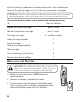
REPLACING THE BATTERY
CAUTION: To reduce th e risk of fire or personal
injury, use only the battery listed on the accessory
order form, which is compatible with th is un it.
1. Make sure the telephone is OFF before you
replace battery.
2. Rem ove the battery com partment door.
3. Disconnect the cord attached to the battery pack
from the jack inside the battery compartment and
remove the battery pack from the handset.