
User's Manual





49
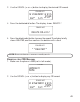
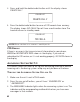
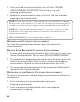
3. During call screening, you can press talk/callback button or pick up the
extension phone to connect to the external caller and start the
conversation. The answ erer stops recording once you answ er the call.
REMOTE ACCESS
This section explains how to use the cordless handset, or any touch-tone
phone, to access the answ ering system with your 4-digit security code.
TIPS: If you access the answerin g system with any other touch-tone phone, a
voice menu guides you through the steps.
ACCESSING THE ANSWERING SYSTEM WITH THE CORDLESS HANDSET
1. Make sure your handset is in standby m ode.
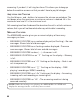
2. Press the ans flash/answer button to access the answering system . The
display shows “
ANSWERER REMOTE ACCESS
”.
3. Follow the voice m enu to use the answering system ’s rem ote functions.
4. Press vol + or vol – button during message playback to adjust the
volum e of earpiece or speaker.
5. At any tim e, you can press the exit button or the flash/answ er button to
abort the current operations and return to the standby mode.
ACCESSING THE ANSWERING SYSTEM FROM ANOTHER LOCATION
You can access your answering system from any touch-tone
phone by entering your 4-digit security code after you hear the
outgoing announcement.
1. Dial the phone num ber to which the answ ering system is connected.
2. When the answering system answers enter the security code after you
hear the tone.
3. Follow the voice m enu to use the answering system ’s rem ote functions.
MEMORY FULL
When you access your answ ering system rem otely, and the answering
system ’s mem ory is full, the system answ ers after 10 rings, beeps, and
awaits for you to enter the 4-digit security code. You have 10 seconds to