
User's Manual





41
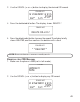
2. Use the CID/VOL ( or ) button to display the desired CID record.
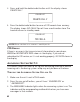
3. Press the delete/redial button. The display shows
DELETE ?
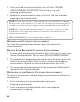
4. Press the delete/redial button to erase the record. The display briefly
show s
DELETED
, and then confirms the deletion with a tone.
NOTE: Press exit button to return to stan dby mode.
DELETING ALL CID RECORDS
1. Make sure the phone is OFF (not in talk mode).
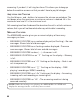
2. Use the CID/VOL ( or ) button to display any CID record.
* * DELETED* *
CALLER LIST
STEVE
12 34567890 1 2 34 5
CALL
#
9:58
AM
11/24
NEW
CALLER LIST
DELETE CALL ID ?
CALLER LIST
HANDSET 1
NAME
11:03 AM
NAME
12 34567890 1 2 34 5
CALL
#
9:58
AM
11/24
NEW
CALLER LIST