
User's Manual



30
TRANSFERRING CALLS
NOTE : For model 25825, you must register an additional handset (model
25802) in order to use this feature.
This feature lets you transfer calls betw een handsets in talk m ode.
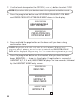
1. During talk mode, press the int/conf button to put the call on hold.
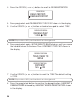
2. Enter the handset number you want to transfer the call to, and the
receiving handset is paged. During the page, a page tone is em itted on
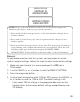
the receiving handset. For exam ple, HANDSET 2 pages Steve’s handset
and the follow ing inform ation show s in the displays:
RECEIVING HANDSET
SENDING HANDSET
NOTE: If th e page isn ’t answered, press th e exit button on h andset or the int/
con f button to cancel th e transfer.
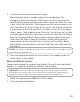
When the int/conf or talk/callback button is pressed on the receiving
handset, the unit goes into intercom mode. When the talk/callback button
on the sending handset is pressed, the call is transferred.
EXTENSION ?
PAGING
TALK 00:30 VOL4
HANDSET 2
PAGING FROM
STEVE
PAGING
HOLD